Supplier Guide - Wholesale Listing & Dropship Fulfillment | Prodex
A supplier lists products at a wholesale price and ships them to the addresses resellers provide. You keep your own catalogue, your own stock and your own dispatch process. The platform never holds the order's money: your courier collects on delivery and you settle with each reseller directly, with every step recorded. This page is the whole process, in the order you will meet it.
During the closed beta
This store is in a closed beta. Resellers see your products only through your invite link (Marketing, then Followers, Invite resellers), so send it to the resellers you work with. No other reseller on the store sees your shop until the beta ends. Its end date will be announced at least 30 days ahead; after it, every approved reseller sees the whole catalogue.
1. Register and get approved
Sign up through this store's seller registration. The app calls that route seller; in a dropship store the seller and the supplier are the same account, and nothing in the product asks you to choose between the two. Submit your shop for review and, where the operator requires it, your verification documents. Your products stay invisible on the storefront until the shop is approved.
2. What makes you a supplier
A product becomes available to resellers when it carries a wholesale price. Without one it is an ordinary retail listing. That single field is the whole distinction, it can be set per variant, and it is what a reseller pays you.
3. Add products
Alongside the wholesale price you set the suggested retail price, the stock you hold and the minimum order you will accept. All three can be set per variant, so a size that is nearly sold out can carry its own stock and its own minimum.
The suggested retail price is what a reseller's own price field opens on. They can move it within the range this store allows, so treat it as guidance rather than a price you are setting for the end customer.
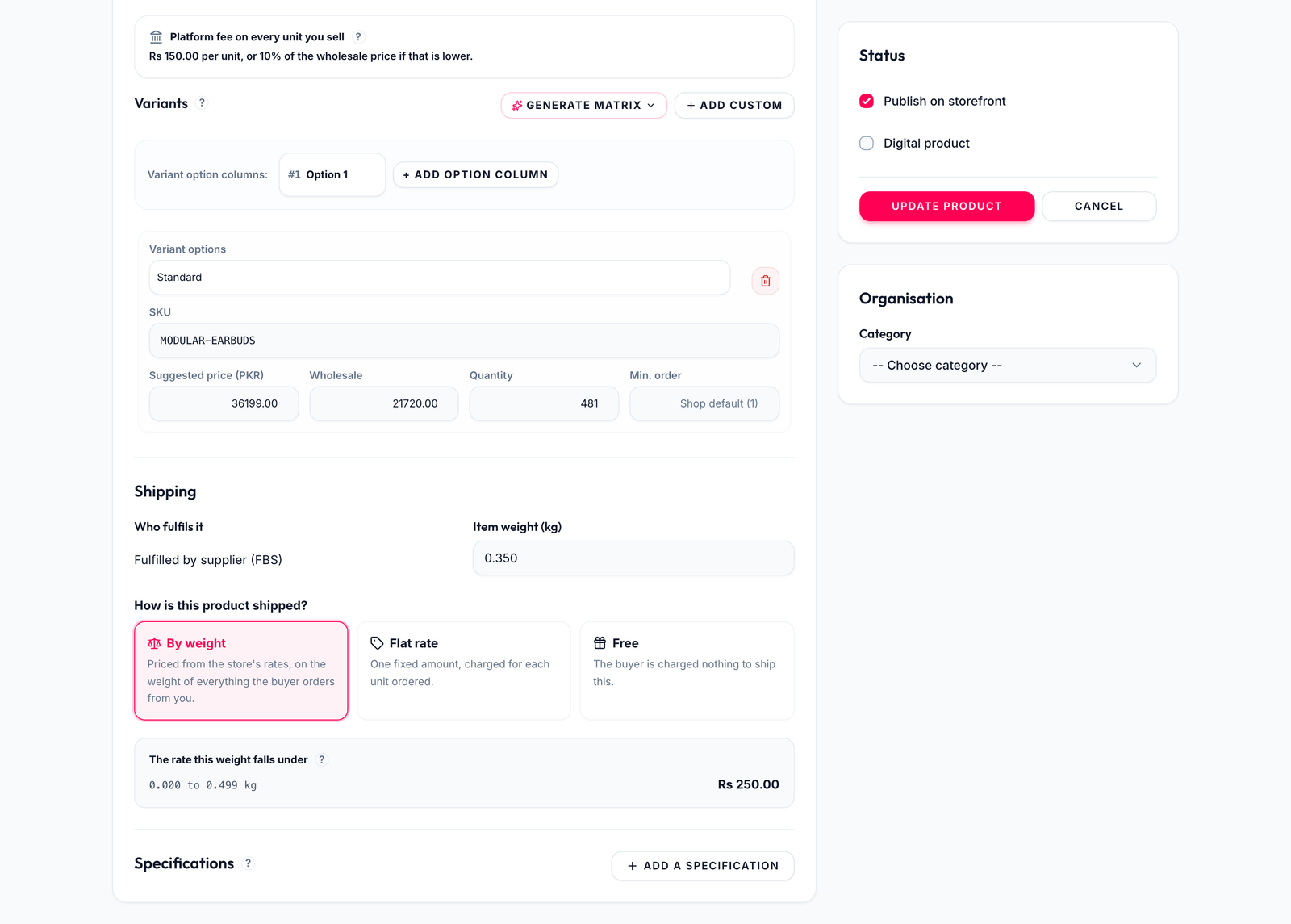
Every product needs its weight in kg, and at least one photo before it can be published; a draft can wait for the photo. To list many products at once, or to update prices and stock, use Upload a spreadsheet on your Products page. Download the template: one row for each variant, and rows with the same product code are one product. Save it as CSV UTF-8 and upload it. The file is checked first and nothing is saved while it has an error; new products arrive as drafts, and a code you already have updates that product. Then Add photos takes many photos at once and gives each to a product by its file name: P-25.jpg is product P-25's cover and P-25-2.jpg its second photo. A photo whose name matches no product is never sent.
4. Set your shipping tariff
Freight is priced by weight band on the combined weight of everything a reseller orders from you, not per item. You set bands per destination country, and a band can add a per-kilogram charge above its own floor, so "first half kilo at one price, each further kilo at another" is a small number of rows rather than a long table.
⚠️ Make sure your bands cover every weight you will ship. The tier page warns you about gaps per destination. An order whose weight falls in a gap is charged your heaviest band, which is almost never what you meant.
If neither you nor the store has a band for a destination, resellers cannot check out your items for that address: the cart names you and asks them to remove your items.
A product can instead carry a flat shipping charge per unit, or ship free. Free wins over everything else. Platform-fulfilled products cannot take a flat rate.
5. Set your payment terms
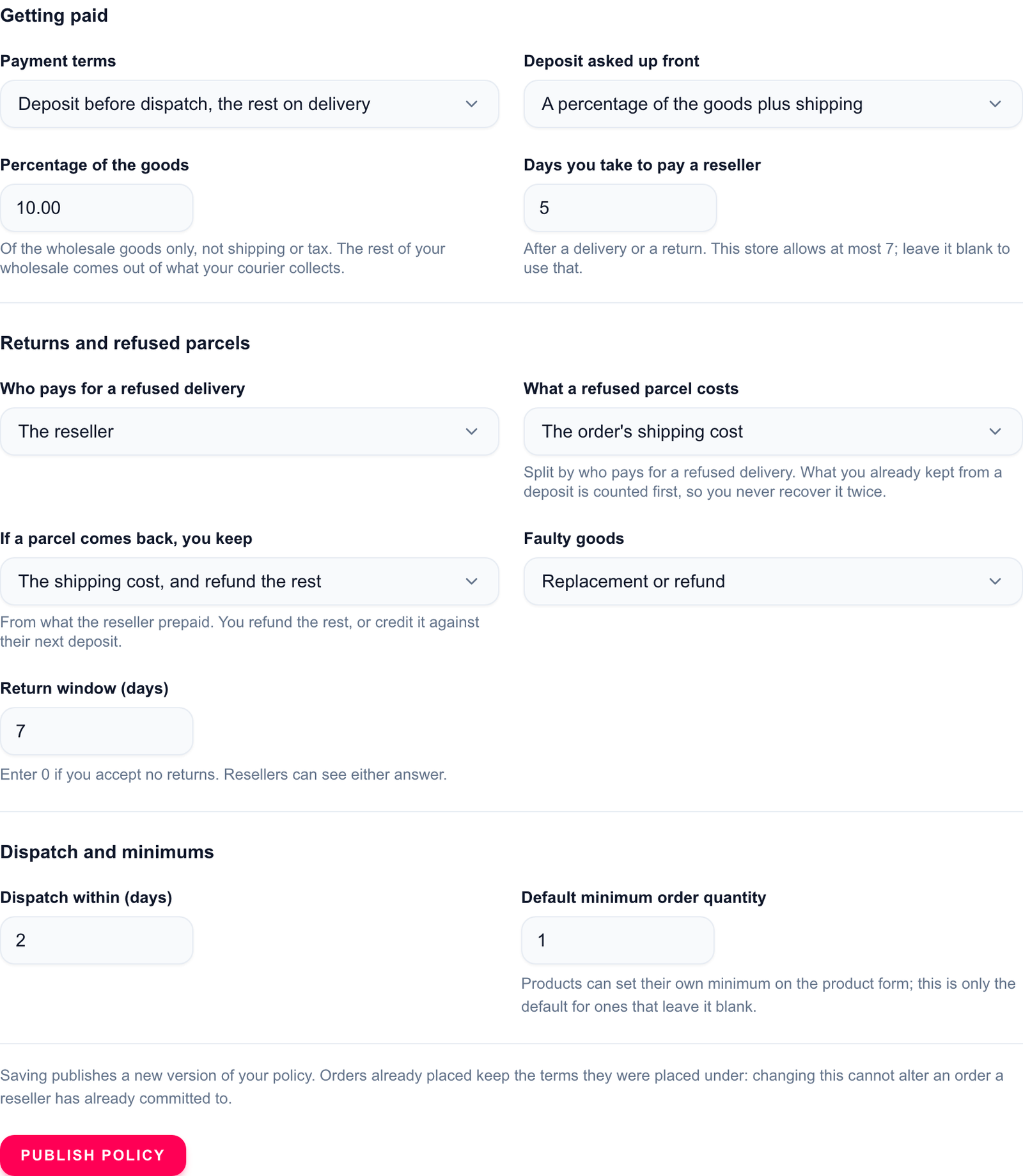
Your terms are part of your Supplier Policy in Shop Settings. Choose one:
- Cash on delivery. Nothing up front; your courier collects and you send the reseller the rest.
- Deposit before dispatch, the rest on delivery. A percentage of the goods, the shipping cost, or both.
- Prepaid. The whole wholesale before you ship.
- Either. The reseller chooses cash on delivery or prepaid, per order.
Also choose what you keep if a parcel comes back: the shipping cost, or, on deposit terms, the deposit. Every change publishes a new version of your policy. Orders already placed keep the version they were sold under, so changing your terms never changes an order in flight.
How do I ask for a deposit?
Choose "Deposit before dispatch, the rest on delivery", then a percentage of the goods, the shipping cost, or both. The deposit is never more than the wholesale the reseller owes you. A deposit, or full prepayment, holds the dispatch until you confirm it arrived.
6. Publish your bank details
Under Payment Instructions in Shop Settings, enter where resellers should send deposits and turn publishing on. A reseller sees them only on an order that owes you money.
7. Fulfil orders
A reseller's order reaches you with the end customer's delivery address already attached. Ship to that address. Move the order through its statuses as you work and enter the tracking details; the reseller and their customer both follow the same record, and the store's public tracking page reads it too.
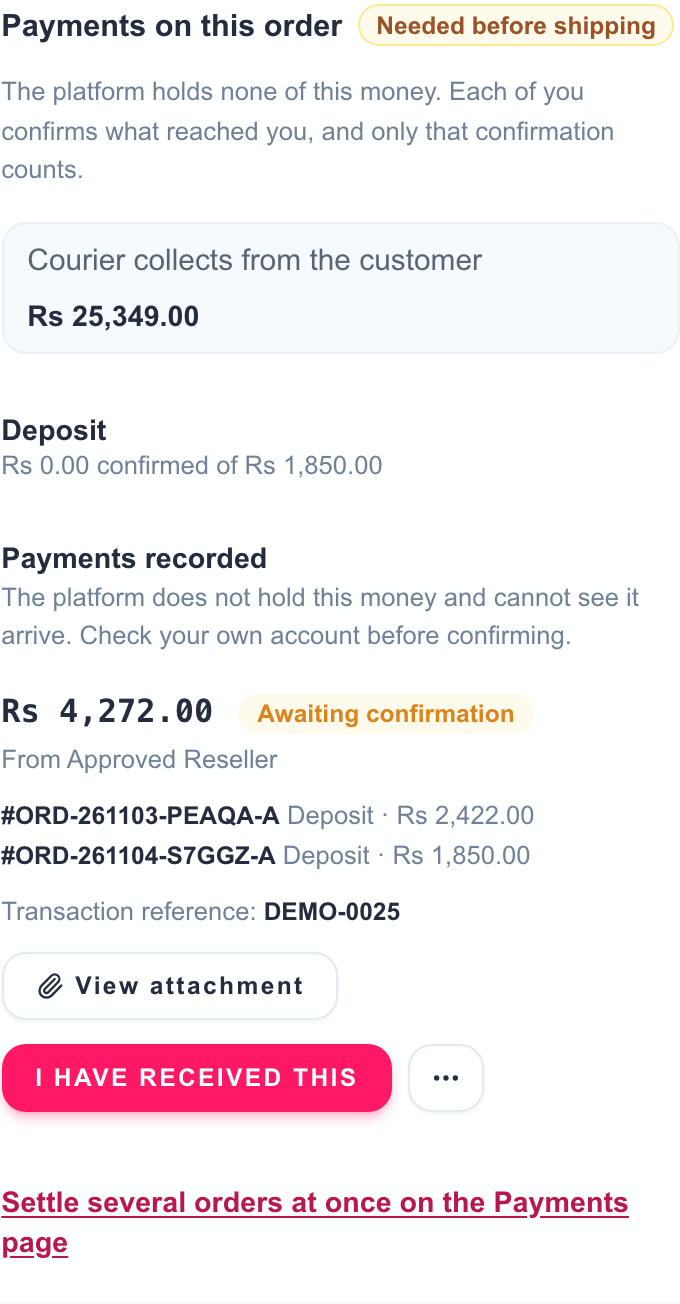
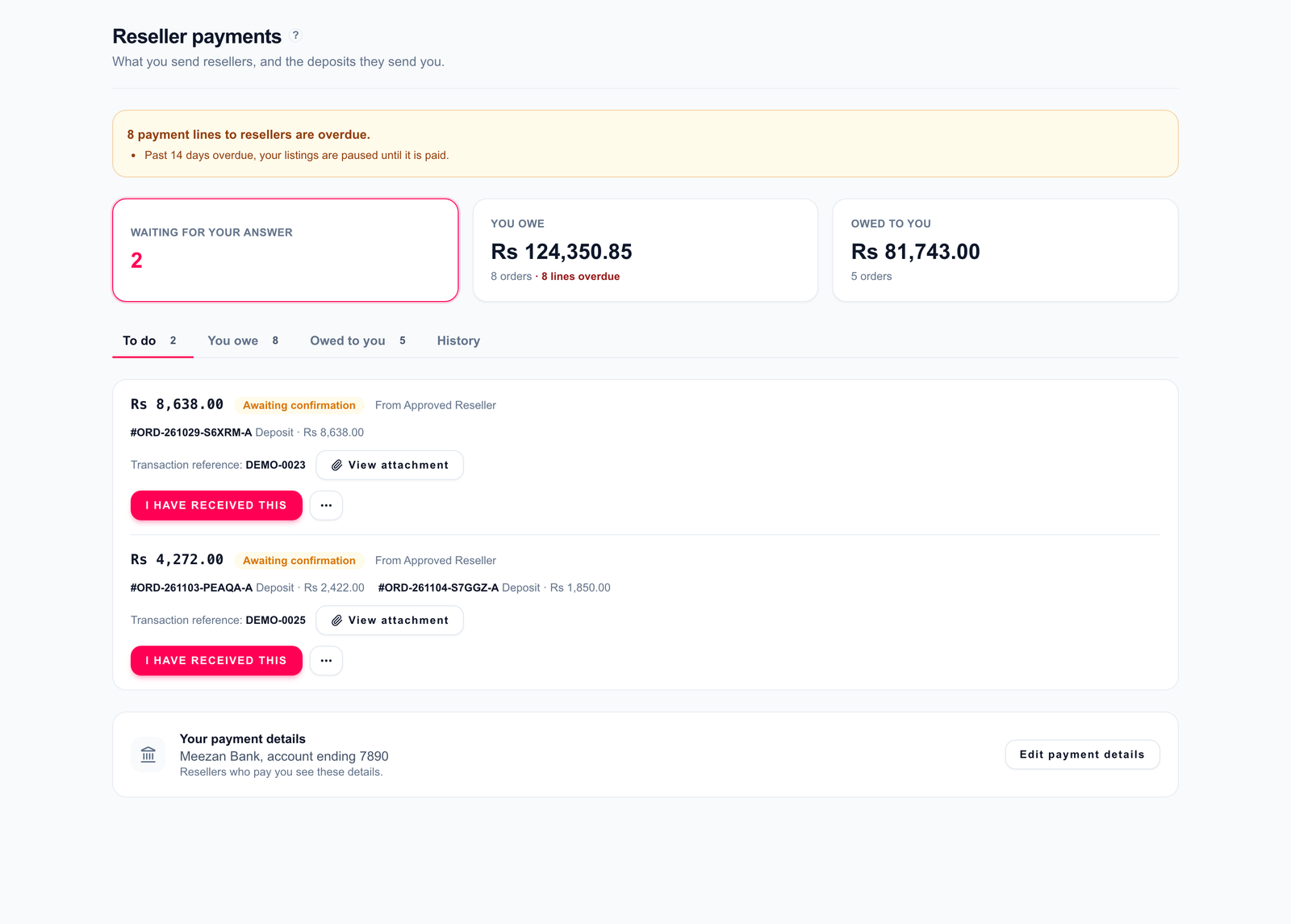
An order that owes you a deposit cannot be marked shipped until you confirm the deposit arrived, and it is not treated as overdue for tracking while it waits. When the reseller records a payment you see it on the order and on Reseller Payments. Check your own account, open the receipt if there is one, then choose I have received this, or open the ⋯ menu beside it and choose Not received with a reason. If only part arrived, choose A different amount arrived in the same menu and confirm what reached you; the rest stays owed and the order keeps waiting for it. Deposits can be paid only until the order ships. If nothing of the deposit is paid or recorded within 7 days of the order, the order is cancelled by itself and its stock comes back; the order page names that day under the deposit.
Orders you receive as a supplier and orders you receive as an ordinary seller appear in the same list.
8. How does the money move on an order?
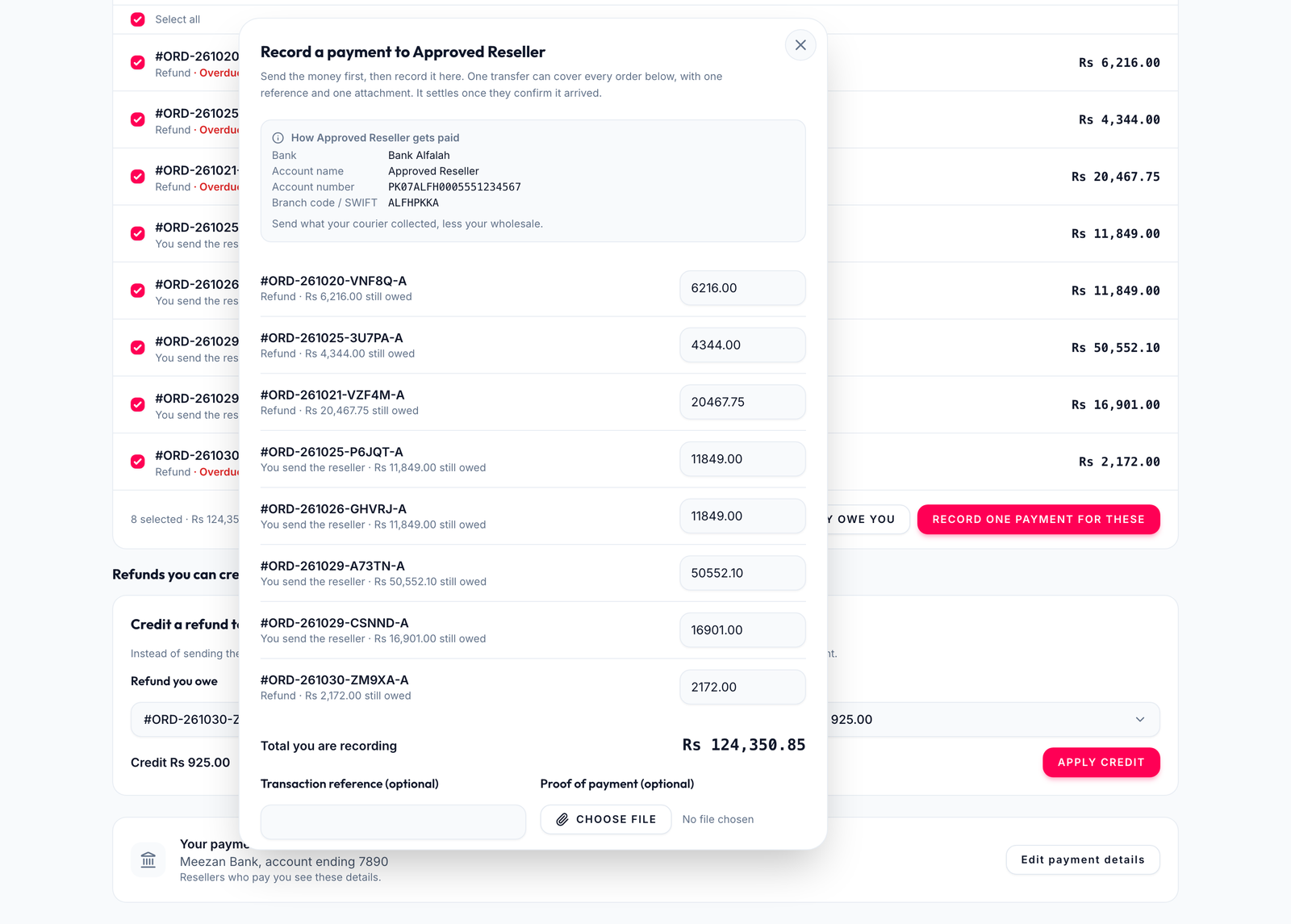
Your courier collects cash on delivery. You keep your wholesale and send each reseller the rest. Everything you owe and are owed is on Reseller payments, in your sidebar under Finances.
What do I send the reseller after delivery?
What your courier collected, less the wholesale you are owed and have not been paid. For example, if your courier collected 267.99, your wholesale is 164.79 and the reseller paid a 25.47 deposit, you keep 139.32 and send them 128.67. The page works this out per order and shows the reseller's bank details once they publish them. Tick several orders to the same reseller and record one transfer with one receipt; they confirm it arrived.
What if the reseller's customer paid part up front?
The reseller enters it at checkout, and your courier is asked to collect only the rest; the order and the invoice show the amount paid in advance and the amount due on delivery. If what your courier collects would no longer cover your wholesale, the reseller's deposit to you rises by the difference, and the order cannot ship until it is paid, as with any deposit. On cash-on-delivery-only terms an advance can never take the collection below your wholesale.
What if I recorded a payment wrongly?
Cancel it before the reseller confirms it. Its attachment is deleted, they no longer see it, and the orders it covered are owed again.
What if the reseller says it has not arrived?
They report it not received with a reason, which you see on the payment, and the amount is owed again. If you are sure it was sent, send the store admin your bank statement through a support ticket. Every dispute is on the admin's list: they check the receipt against the bank record and rule, confirming the payment or upholding the reseller, and both of you are emailed the decision and the reason.
What if the reseller never answers?
They are reminded after 2 days. After 7 days the payment goes to the store admin, who checks your receipt and confirms it or marks it not received on their behalf. It is never confirmed by silence, and while it waits it still counts against what you owe.
How long do I have to pay a reseller?
The days in your policy, up to the store's limit of 7 days, from the delivery or the return. Your payments page marks anything overdue. A payment you have recorded stops the clock while the reseller checks it. If anything stays overdue for more than 14 days, including orders left without tracking, your listings are paused for new orders until it is cleared; orders already placed carry on.
Can we settle up in one transfer?
Yes. When you and a supplier owe each other, whoever owes more chooses Settle up on the payments page: what they owe, less what the other owes them, sent as one transfer for the difference. Nothing settles until the other side confirms the whole statement.
9. Returns and refunds
What if a parcel comes back?
Your policy says whether you keep the shipping cost or the whole deposit from what the reseller prepaid. You refund the rest. Instead of sending it, you can credit it against a deposit the same reseller owes you on another order: no money moves and both orders update.

What if the parcel was delivered, or the courier collected less?
When you mark a shipped parcel returned, attach the courier's return slip; the reseller sees it and may contest the return within 7 days. When you mark an order delivered, enter the cash your courier actually collected if it was less than the total, with the reason. If what was collected does not cover your wholesale, after the deposit, the reseller owes you the difference as a short collection, due like any other payment. An admin decides any contest, and a return corrected to delivered means you owe the reseller what was collected. Pick your courier from the store's list at dispatch, so both order pages link to tracking.
What if a reseller wants to cancel?
Before you accept an order the reseller can cancel it at once; you are emailed and must not ship it. Once you have accepted it they can only ask: the order page and your dashboard show the ask with their reason, and you are emailed. Cancel it from Shipping if you can. If you ship it anyway and the customer refuses it, the reseller owes no return charge, keeps their whole deposit, and the refusal does not count against them.
What if the customer returns something after delivery?
A return request reaches your order page. Accept it, with return instructions, or decline it with a reason, before the goods travel. When they arrive, choose Returned items received and say, for each item, what goes back into stock and what cannot be sold, and why. Then resolve it: send the same item, offer a different product (the reseller accepts the price difference first), refund an amount you set, or reject it after inspection. A replacement carries no platform fee, because it is the same sale. What you owe the reseller from the courier's collection stays owed; a refund is added to it.
A parcel that comes back undelivered is recorded the same way, with Returned items received, so only what can be sold goes back on sale. If you have not recorded it within 7 days of it being marked returned, you get a reminder, so a parcel lost on the way back is noticed.
10. Pause without disappearing
Vacation mode stops new orders for a date window you choose and can leave an auto-reply, instead of you deleting listings and rebuilding them later. Resellers see the pause on your products before they try to order.
11. Fees, your balance and your statement
On this store a supplier's platform fee is Rs 10.00 per unit, or 10% of the unit's wholesale price when that is less. It is taken from your prepaid fee balance when the order ships. If the fees you owe pass Rs 3,000.00, your listings are paused for new orders until you top up; orders already placed carry on.
The fee is itemised on each order and totalled in your fee statement, which downloads as a CSV. You top up the balance yourself with proof of payment, confirmed by an operator. ⚠️ The figures on this page are this store's current settings; the order screens and the statement are the record of what was charged. A top-up sent with the wrong photo or amount can be cancelled on the Top-up requests tab while it waits; then send a new one.
Unused money in your balance can come back: use Ask for a refund on your wallet page. An admin checks the request and returns it by bank transfer, only to the account your top-ups came from. Promotional credit is never refunded. Unused leaves out the fees on your orders not yet shipped, which come out of the balance when those orders ship. While a request waits, the amount you asked back no longer counts towards your fee limit, and Cancel request beside it takes it back.
12. Media, messaging and support
Product images are managed from your media library and reused across listings. Messages from resellers are attached to the order they concern, so a query about a parcel stays with that parcel.
Can I ask about my own orders?
Yes. The help assistant button at the top of every page answers questions about the orders you have to ship, the payments waiting for your answer, what you owe and are owed, and your stock, and about how this store works, in English, Urdu, Roman Urdu or Arabic. It reads your account each time you ask and changes nothing on it. It is for an active account; its answers can be wrong, so the order and payments pages are the record.
13. Your followers
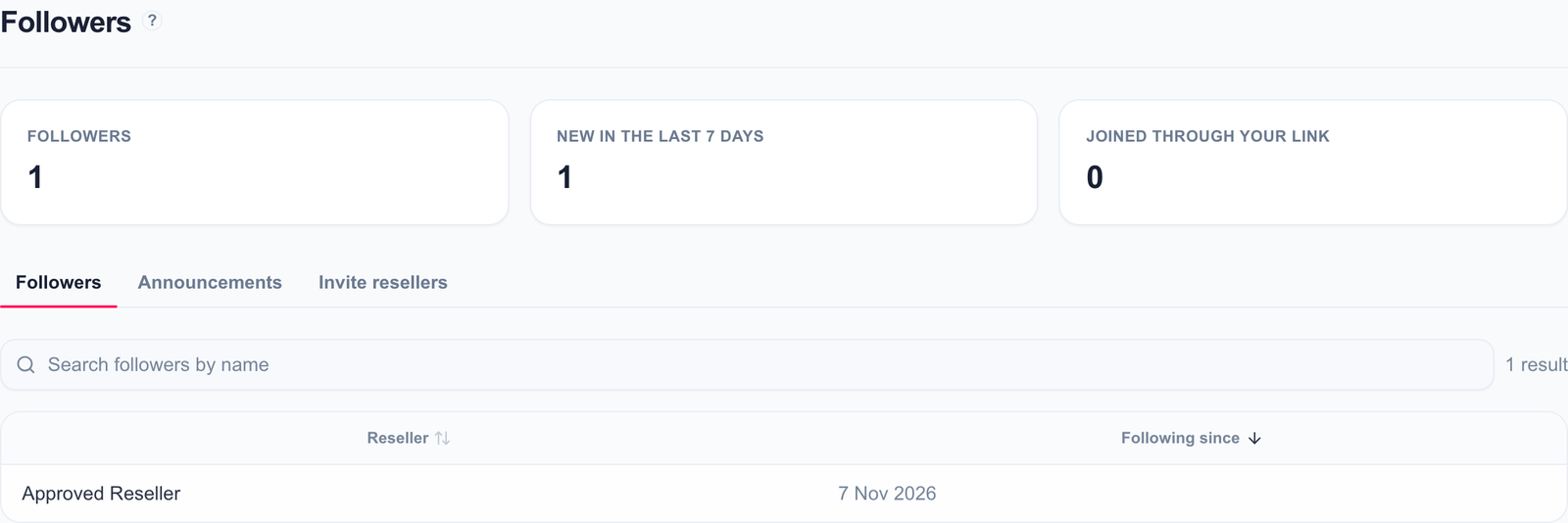
Resellers can follow your shop from your supplier page. Marketing, then Followers shows how many follow you, how many started in the last seven days, and their names. Their contact details stay private.
Followers are told, without you doing anything, when you list a product or publish a hidden one, restock a product that had sold out, change a wholesale price, publish new terms, or start or end a vacation, and when your listings stop or start taking new orders (never why). New terms reach them by email at once; everything else arrives in a daily summary.
Can I invite resellers I already work with?
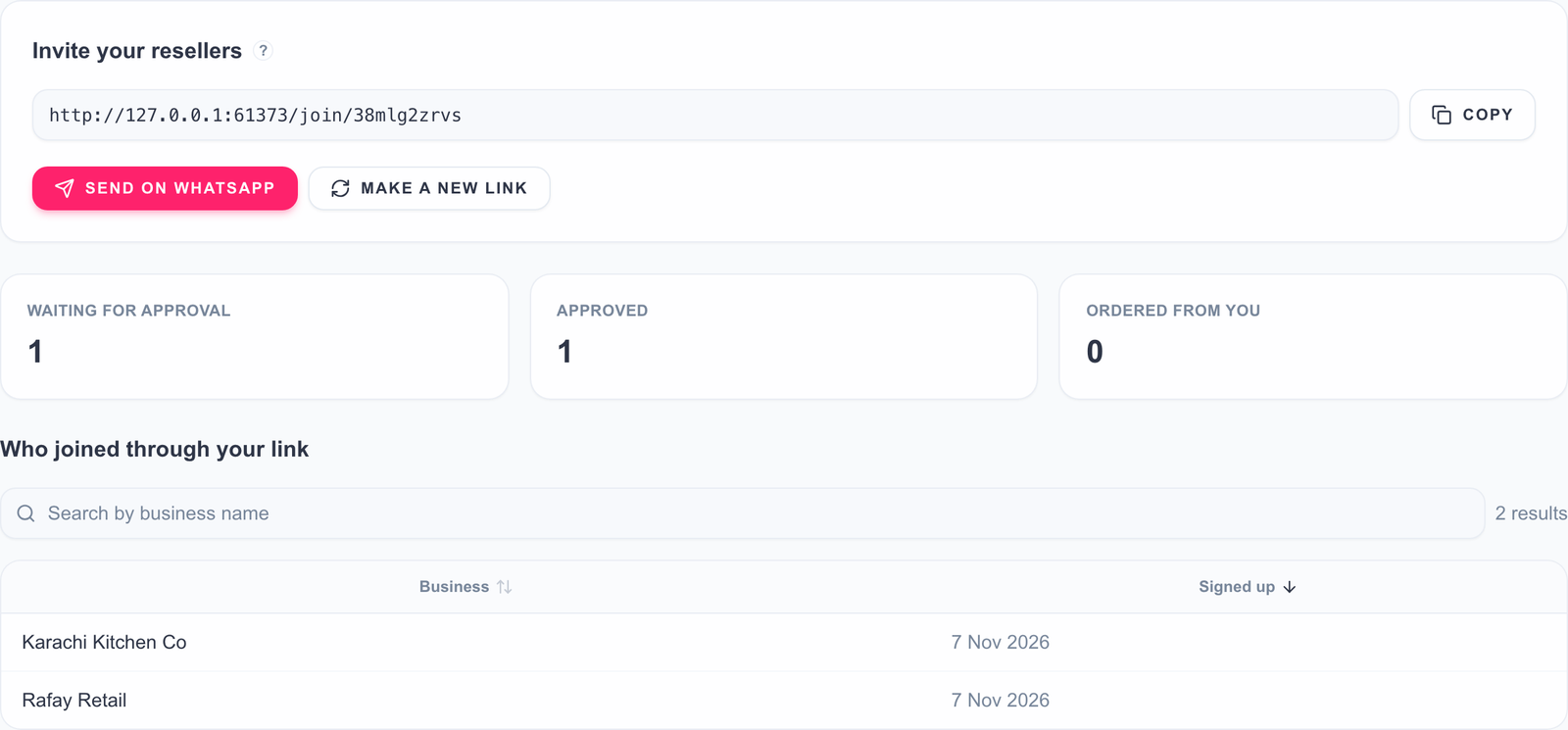
Yes. The Invite resellers tab on the same page gives you a link to send them, on WhatsApp or anywhere else. A reseller who signs up through it follows you from the start, and the store still approves each account. You see how many signed up, how many are waiting for approval or were approved, and how many have ordered from you, and each one by their business name. Make a new link stops the old one working; resellers who already joined stay counted.
What do resellers read about my shop?
Shop settings has a Shop profile: a line about your shop, up to 300 characters, and the city you ship from. Both show under your name on your supplier page; leave one empty and nothing shows in its place. Once five reviews stand on your products, the page also shows their average rating. An admin may also award your shop a badge after our team checks something by hand, such as a visit to your warehouse or a sample we ordered. It shows beside your name with what was checked and when, and on Shop settings under Your badges. There is nothing to apply for.
Your supplier page also shows your Track record from your orders on this store in the last 90 days: orders shipped within the dispatch days in your terms, what you owed resellers sent in full by the due date, your delivered orders, and outcomes or payment disputes an admin decided against you. It comes only from the store's records and is updated daily, so the way to improve it is to ship and pay on time. Each order page shows the reseller's track record the same way, under their business name: refused parcels, payments to you made by their due date, delivered orders, decisions against them and whether they are suspended. If a figure looks wrong, open a support ticket.
Can I write to my followers?
Yes. Write to your followers sends one message to all of them, optionally about one of your products. You can send three in any seven days. Messages go out at once; an admin may remove one that breaks the store's rules, and you are told why.
Where the figures live
Your dashboard opens on what is waiting for you: orders to accept or ship, oldest first, and the payments and balances that need an answer. Orders carries every order placed against your catalogue, its status and the amounts involved. The public home page lists every capability this store currently runs, read from its configuration rather than written down.
Under it, What could pause you lists each rule that hides your products from resellers: your fee balance, payments to resellers overdue past the grace period, and orders left without tracking. Each shows where you stand and, for anything overdue, the date your products would be hidden; while one is close, every page of your portal says so.
See also the Reseller Guide for what your buyers see.
Where this store publishes its Terms of Service, Privacy Policy and Refund & Return Policy, they are linked from the footer of every public page and from the signup form.