Reseller Guide - Wholesale Sourcing & Dropshipping | Prodex
A reseller buys from this catalogue at wholesale prices and has each order shipped straight to their own customer. You hold no stock and never handle a parcel, and the platform never holds the order's money: your customer, you and the supplier settle it between you, and every step is recorded. This page is the whole process, in the order you will meet it.
During the closed beta
This store is in a closed beta. You see the products and pages of the suppliers whose invite link you used, and you follow a supplier by opening their link while signed in; the Follow button and Suppliers I follow stay hidden until the beta ends. If you signed up without a link, ask a supplier you work with for theirs. Its end date will be announced at least 30 days ahead; after it, every approved reseller sees the whole catalogue.
1. Apply for a reseller account
Register as a customer, then apply from your dashboard. An operator reviews the application. Until it is approved you can reach this store's public pages, but the catalogue and wholesale pricing stay hidden: this is a closed network, not a shop with a members' discount.
2. Read a product page
Once approved, a product shows you four things a retail shopper never sees: the wholesale price you pay, the supplier's suggested retail price, the stock the supplier currently holds, and the minimum quantity that supplier will accept for that item. Products with variants carry stock and a minimum per variant, not per product.
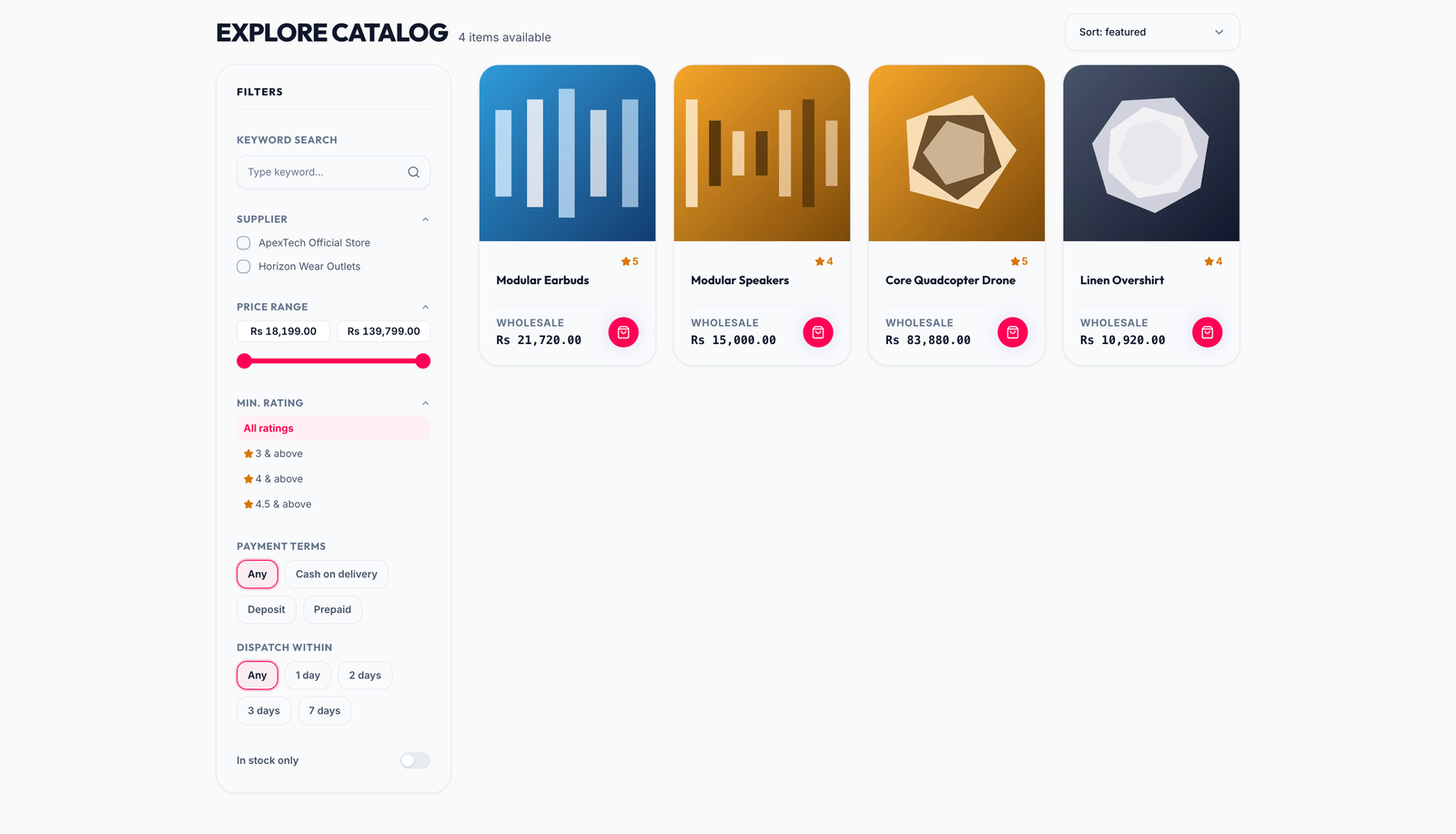
Search a supplier's name, a brand among them, and the supplier shows above the products, with its badges and track record; tap it for its whole catalogue.
Or tick suppliers under Supplier in the filters. It lists every supplier with a product that matches your other filters, not only those on the screen.
3. Set your own retail price
You decide what your customer pays, per order line. The field opens on the supplier's suggested price and you can move it: it must stay above the wholesale price, and it cannot exceed the ceiling this store sets. Your margin is calculated and shown before you commit, so nothing about the arithmetic is left to you.
The suggested price is a suggestion. It is not what anyone is obliged to charge, and it is not what the supplier is paid.
How do I send a product to my customer?
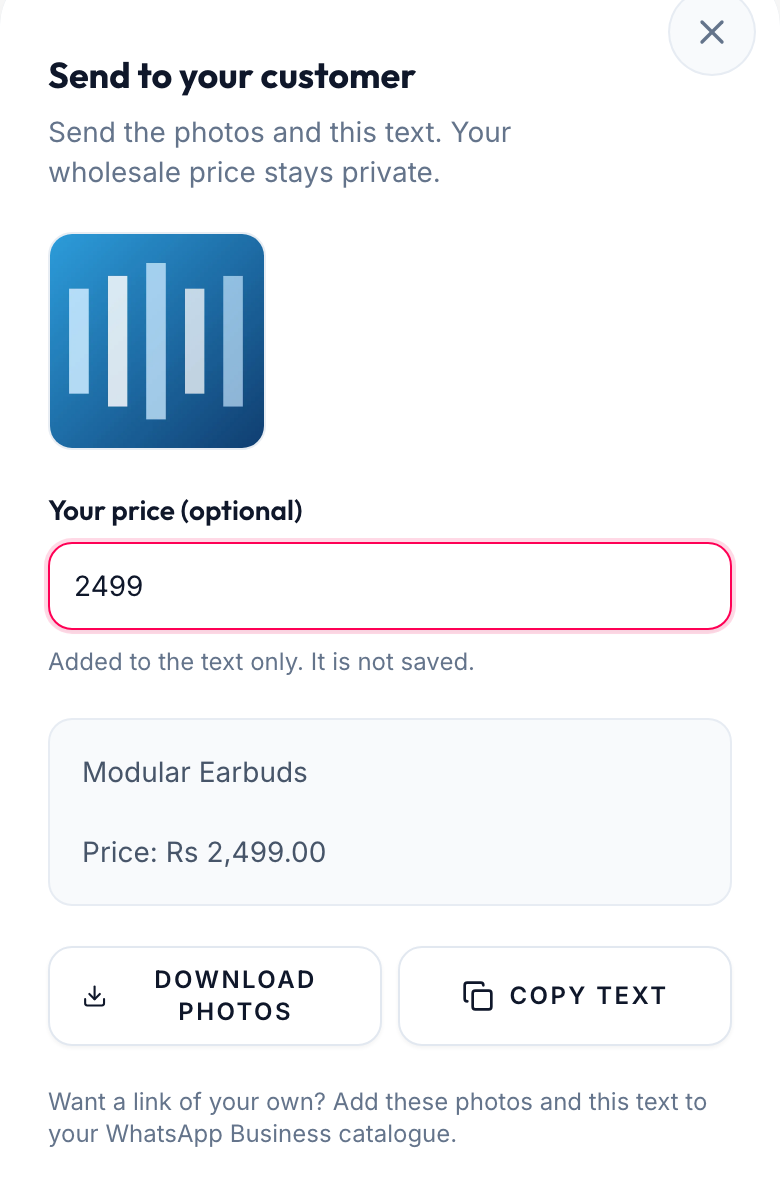
Choose Share on a product. Your customer cannot open this store, so you send the product itself: its photos and its name and description, with your own price added if you type one. Your price is not saved. On a phone, Send to WhatsApp or another app sends the photos and the text together; elsewhere, download the photos and copy the text. The wholesale price and the supplier are never included.
Nothing you send carries a link to this store. For a link of your own, add the photos and text to your WhatsApp Business catalogue. On the product page, Copy details and Download photos give you the full description, the specifications and every photo for your own listing, again with no price and no supplier.
4. Build the cart
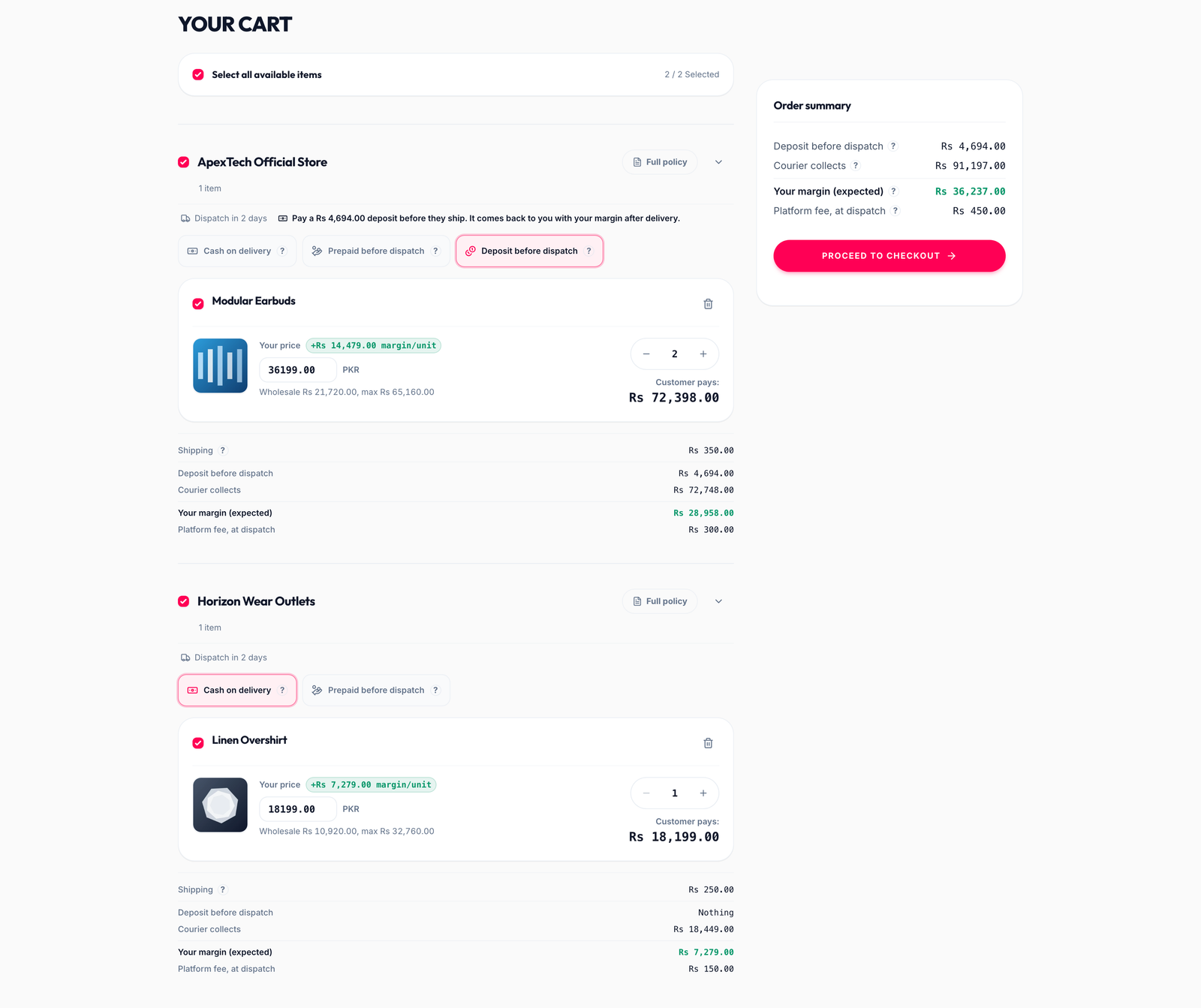
The cart groups lines by supplier, because each supplier ships their own items, sets their own minimum order and has their own stock. A group that is below its minimum, or over the stock available, blocks checkout and says which line is the problem. Other groups are unaffected.
5. Shipping is priced per supplier, on combined weight
Freight is charged per supplier package, not per item: the weights of everything you order from one supplier are added together and one weight band prices the lot. Bands are set per destination country and can be set per supplier, and a band may add a per-kilogram charge above its own floor.
The cart names the band it used, so the figure and its reason arrive together. If nothing in the tariff covers your combined weight, the cart says so rather than quietly charging the heaviest band. If a supplier has no shipping rate at all for your customer's address, the cart names them and their items cannot be checked out until they add one; remove those items to check out the rest. Some products carry a flat shipping charge or ship free instead; those say so too.
6. How does the money move on an order?
Your customer pays cash on delivery to the supplier's courier, or pays you directly. You pay a supplier only when their terms ask for money up front. After delivery the supplier keeps their wholesale share and sends you the rest. Each supplier publishes their own terms, and every order keeps the terms it was placed under, even if the supplier changes them later.
| The supplier's terms | You pay up front | After delivery |
|---|
| Cash on delivery | Nothing | The courier collects your retail price; the supplier keeps the wholesale and sends you the difference |
| Deposit (a share of the goods, the shipping, or both) | The deposit | The supplier keeps the wholesale less your deposit and sends you the rest |
| Prepaid | The whole wholesale | The supplier sends you everything the courier collected |
| Either | Your choice per order: nothing, or the whole wholesale | As for the option you chose |
| Your customer paid you part up front | The deposit, raised if needed so the supplier's wholesale is covered | The courier collects only the rest; the supplier keeps the wholesale less your deposit and sends you anything left |
| Your customer paid you directly | The whole wholesale | Nothing is collected, so nothing comes back |
Do I pay the supplier before they ship?
Only if their terms ask for a deposit or full prepayment. The checkout shows the amount under that supplier's items before you order, and the supplier cannot mark the order shipped until they have confirmed your payment arrived.
How is a deposit worked out?
A supplier asks for a percentage of the goods, the shipping cost, or both, and never more than the wholesale you owe them. For example, 10% of 154.80 of goods plus 9.99 of shipping is a deposit of 25.47. The rest of their wholesale comes out of what their courier collects.
7. Check out
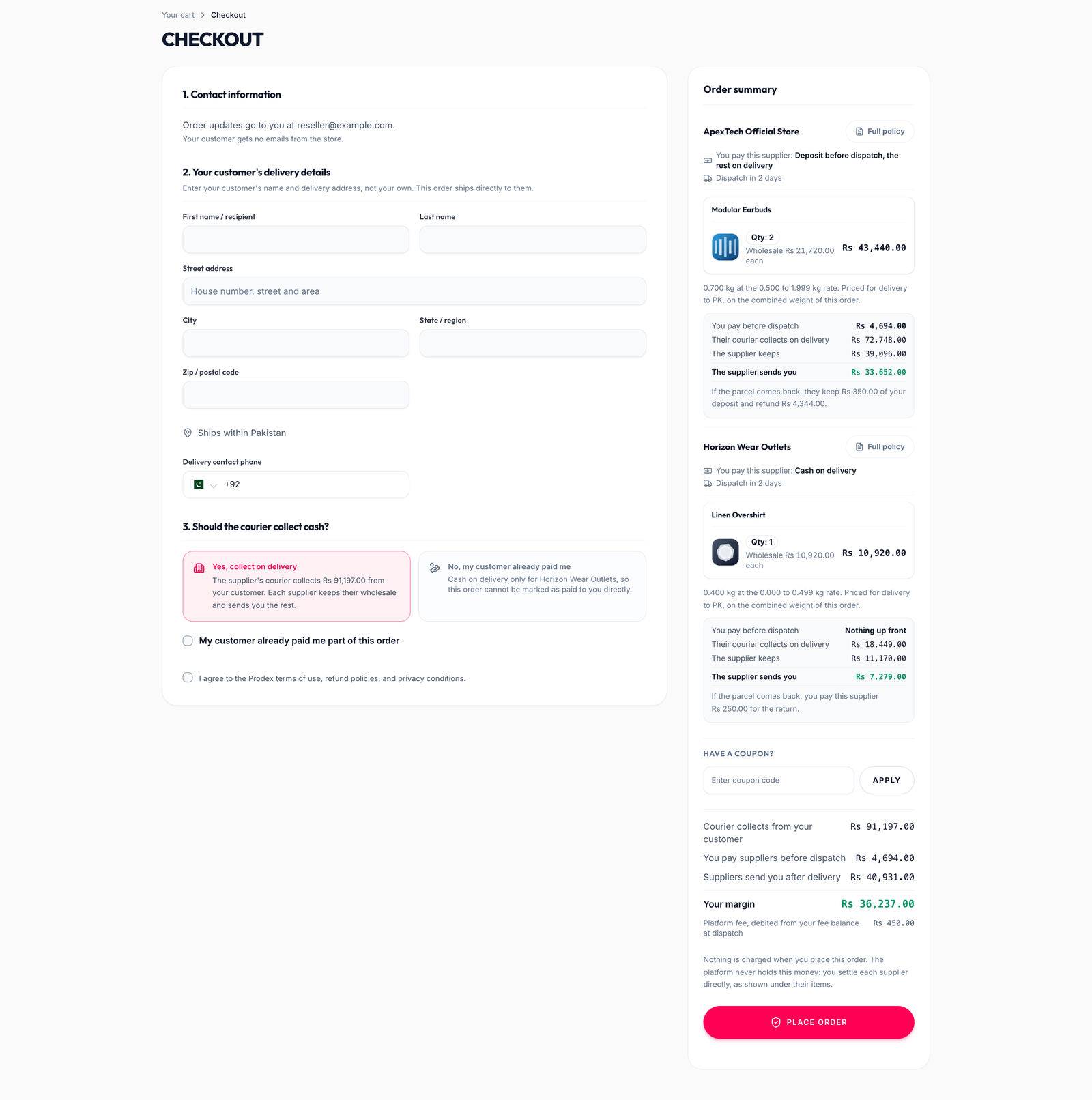
The delivery address is your customer's, not yours: it is the address the supplier ships to and the one on the tracking. Then answer Should the courier collect cash?
- Yes, collect on delivery. The supplier's courier collects your retail price. You pay only the deposits the suppliers ask for.
- No, my customer already paid me. Your customer has already paid you, so nothing is collected on delivery and you pay each supplier their whole wholesale before they ship. A supplier who takes cash on delivery only cannot accept this, and the checkout names them.
What if my customer paid me part of it already?
Under Yes, collect on delivery, turn on My customer already paid me part of this order and enter what they paid, per supplier. The courier then collects only the rest. If that no longer covers the supplier's wholesale, your deposit to that supplier rises by the difference, and the checkout shows the new figures before you order. Your margin is the same either way: you already hold part of it. A supplier who takes cash on delivery only accepts an advance up to your margin on their items.
Under each supplier the summary shows what you pay before dispatch, what their courier collects, what the supplier keeps and what they send you. Nothing is charged when you place the order.
8. Pay a deposit
Everything you owe and are owed is on Supplier payments, in your sidebar under Finances. Three figures at the top show what is waiting for your answer, what you owe and what is owed to you; each opens its list, and History has every payment either way.
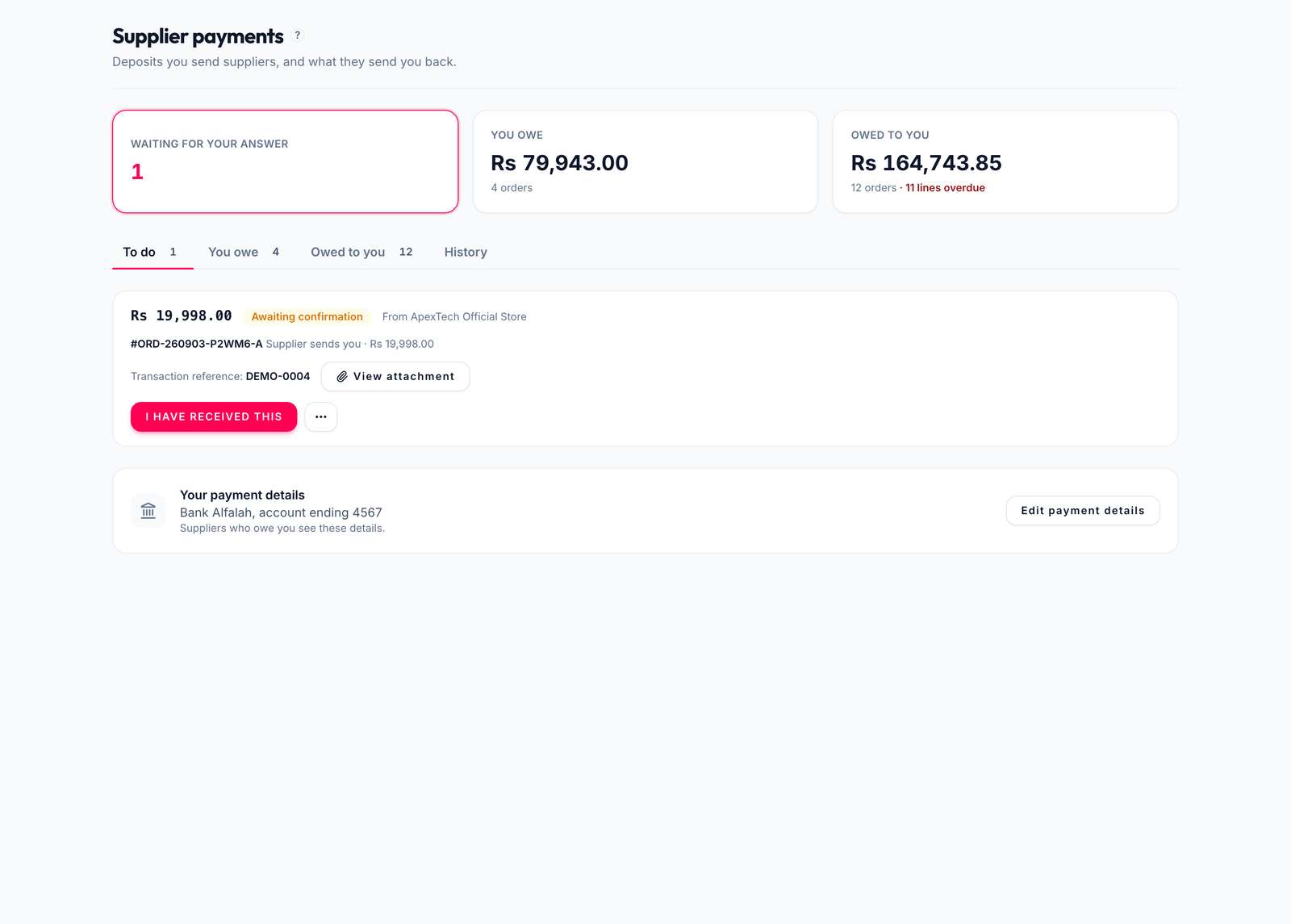
Can I pay several orders at once?
Yes. Tick every order you owe one supplier, or Select all, and record one payment for them: one transfer, one reference and one receipt. The supplier's bank details are shown in the same window. Send the money first, then record it.
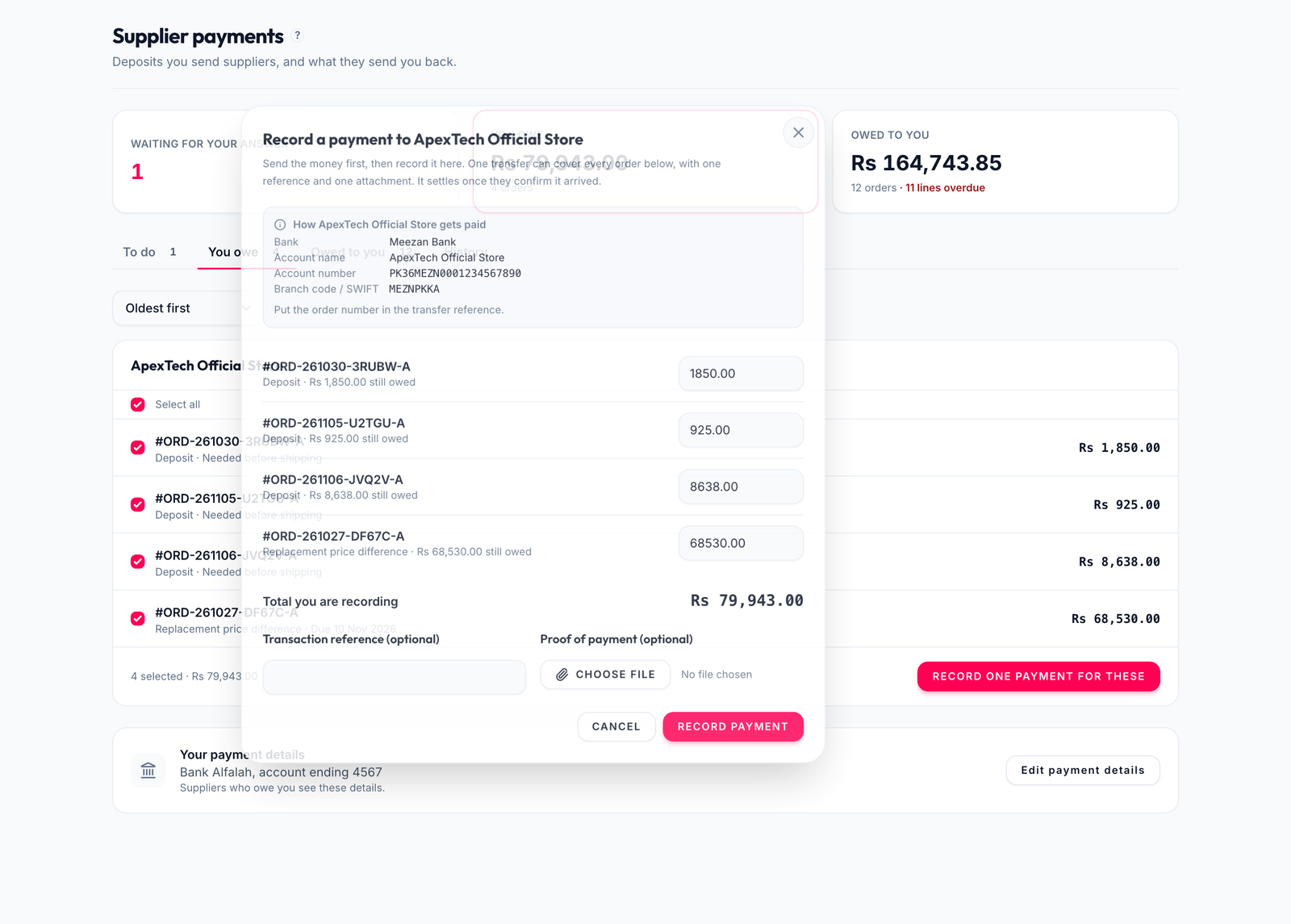
A payment counts once the supplier confirms it arrived. Until then it is shown as awaiting confirmation and is no longer counted as owed, so nothing can be paid twice by mistake.
What if I recorded a payment wrongly?
Choose Cancel payment on it before the supplier confirms it. The record and its attachment are deleted, the supplier no longer sees it, and the orders it covered are owed again, so you can record it correctly.
What if the supplier says it has not arrived?
They report it as not received and give a reason, which you see on the payment. Check with your bank, then cancel it and record it again with the right details if it was wrong. If you are sure it was sent, send the store admin your bank statement through a support ticket. Every dispute is on the admin's list: they check the receipt against the bank record and rule, confirming the payment or upholding the supplier, and both of you are emailed the decision and the reason.
What if the supplier never answers?
They are reminded after 2 days. After 7 days the payment goes to the store admin, who checks your receipt and confirms it or marks it not received on their behalf. It is never confirmed by silence, and while it waits it still counts against what you owe, so nobody asks you to pay it twice.
Can we settle up in one transfer?
Yes. When you and a supplier owe each other, whoever owes more chooses Settle up on the payments page: what they owe, less what the other owes them, sent as one transfer for the difference. Nothing settles until the other side confirms the whole statement.
9. Get your share after delivery
Publish your own bank details under Payment Instructions in Settings (at the bottom of your sidebar; the payments page shows a summary with an Edit button), so suppliers who owe you know where to send it. They are shown only to a supplier who owes you money, and only while publishing is on.
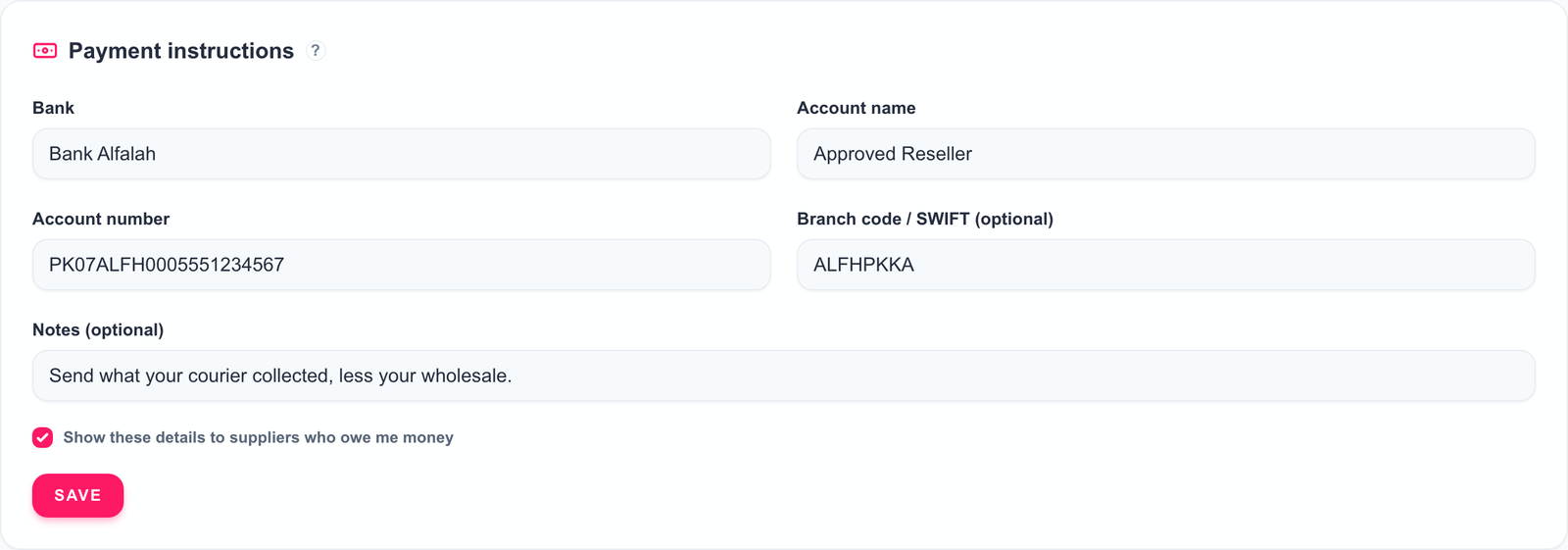
How do I get my share after delivery?
The supplier records what they sent you, with a receipt, and it appears under To do on the payments page. Open the receipt in place, zoom in if you need to, check your own account, then choose I have received this, or open the ⋯ menu beside it and choose Not received with a reason. The platform cannot see the money arrive, so only your confirmation settles it. If less arrived than they recorded, choose A different amount arrived in the same menu and confirm only what reached you; the rest stays owed to you. A payment you reported not received can still be confirmed if it turns up later. If you report one not received and the supplier shows it was sent, the store admin may rule that it arrived after checking the bank record; you are emailed the decision and the reason.
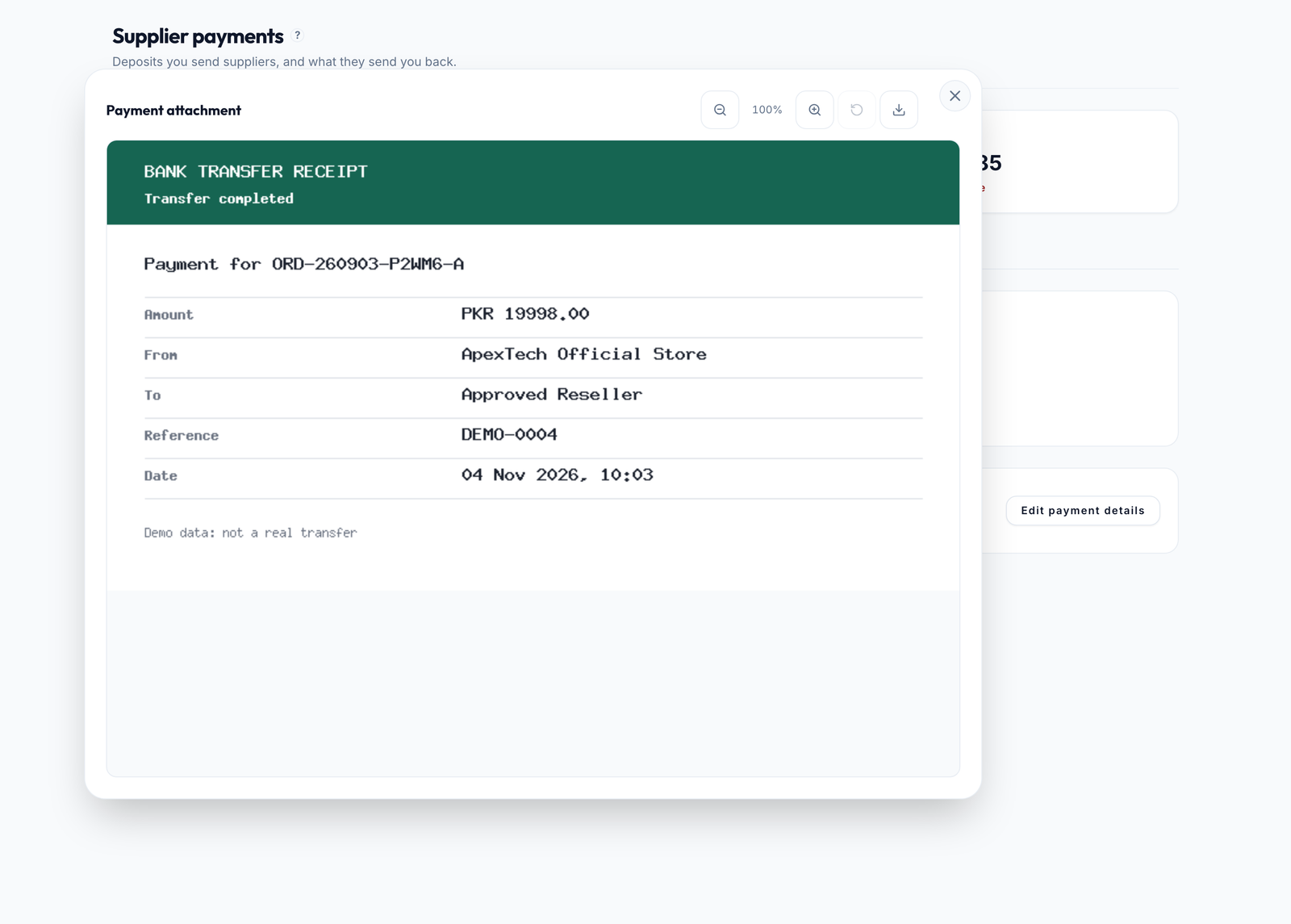
10. Returns and refunds
What if a parcel comes back?
If you paid a deposit or prepaid, the supplier's policy says what they keep: the shipping cost, or the deposit. They refund the rest, or credit it against your next deposit to them, and either way it shows on both orders. What the returned parcel cost you is worked out on the order from the supplier's policy; you do not type it in.
What does a refused parcel cost me?
The supplier's policy names it: the order's shipping cost or a flat amount, paid by you, by them, or half each. The checkout shows it under each supplier before you order. What they already kept from your deposit counts first, so you only pay what it does not cover, as a Return charge on your Supplier Payments page.
What if the parcel was actually delivered?
The order shows the courier's return slip and a Track parcel link. If your customer did receive it, choose Contest this return within 7 days of the return being recorded and say what happened. An admin checks the courier record. While it waits, the return does not count against you, and if the admin corrects it to delivered, the refund and return charge are cancelled and the supplier owes you what was collected.
Can refused parcels pause my account?
Your account pauses for new orders when, in the last 90 days, 5 or more of your parcels are refused and they are also at least 30% of the parcels you shipped. A return you have contested does not count while the contest is open. Each refusal stops counting after 90 days, and the pause lifts by itself when the count falls. If you have fixed the cause, ask the store to continue from the notice on your dashboard; if it reopens your account, 3 refusals keep counting, so 2 more would pause it again. Orders already placed carry on. Your dashboard's What could pause you shows how many count now, how many more would pause you and the date the oldest stops counting, and every page of your portal says so while you are close.
Can a late payment to a supplier pause my ordering?
If a payment you owe a supplier (a return charge, a replacement's price difference or a short collection) stays unpaid for more than 14 days after its due date, new orders and the wholesale catalogue close until it is paid; orders already placed carry on. A payment you have recorded that waits for the supplier's answer stops the clock, and a charge you have contested pauses nothing while an admin decides.
What if the courier collected less than the order total?
The supplier records what was collected and why, and what they send you is worked out from that. If your customer paid in full, choose Dispute the amount collected on the order; an admin decides. If what was collected does not even cover the supplier's wholesale, after your deposit, you owe the supplier the difference: it appears on your Payments page as a short collection, with a due date like any other payment.
Can I cancel an order?
Until the supplier accepts it, choose Cancel order on the order page and give a reason: it stops at once, any deposit you paid is owed back in full, and no fee is charged. Once they accept it, choose Ask to cancel: the supplier decides, since they may have packed it. If they ship it after you asked and your customer refuses it, you owe no return charge, your whole deposit is owed back to you, and it does not count towards your refused parcels. The platform fee taken when it shipped stays, as on every parcel that ships.
What if the customer returns something after delivery?
On the order page choose Return items, inside the supplier's return window, with the reason, the outcome you want, and a photo if it helps. The outcomes you can ask for follow the supplier's policy. The supplier accepts or declines first; send the items back only after they accept. When the goods arrive, the supplier either sends a replacement or refunds an amount they set, with a reason you can see if it is less than the returned items at wholesale. If they offer a different product, you see the price difference and accept it first. A replacement carries no platform fee, because it is the same sale. What the supplier owes you from the courier's collection stays owed throughout. If you disagree with their answer, contest it and an admin reviews it.
11. Your order page
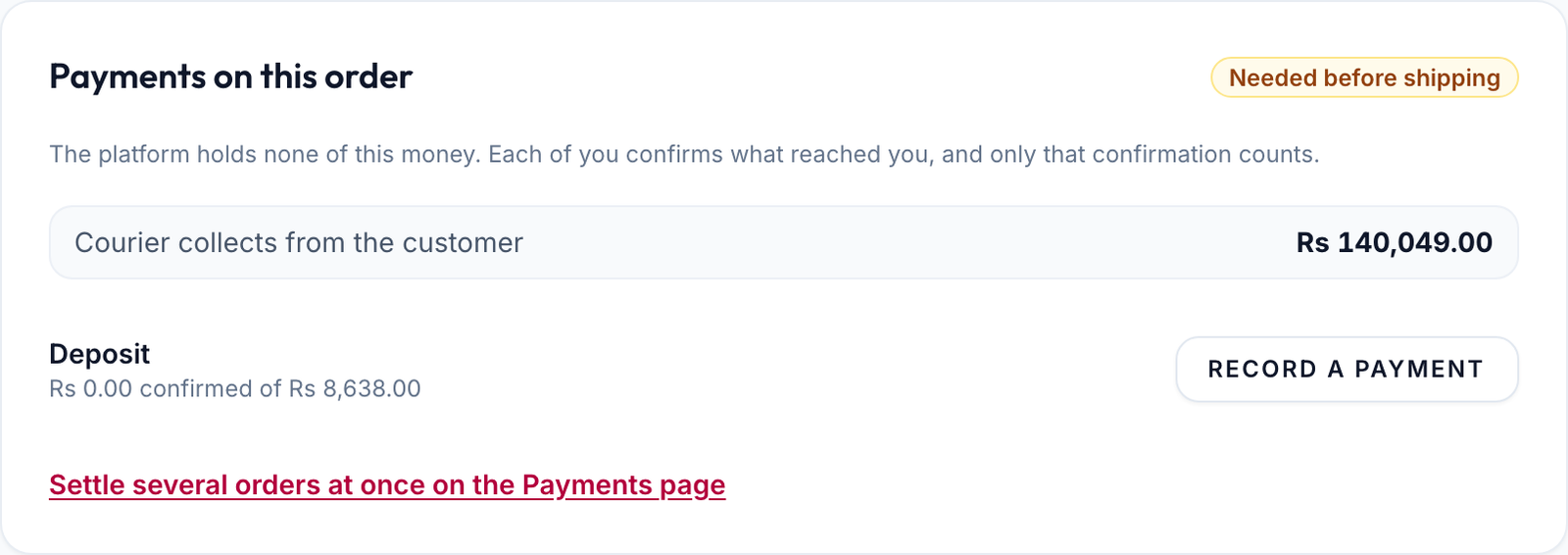
Every order shows the terms it was placed under, what is due on it in each direction, what has been confirmed, and every payment that covered it. A deposit still holding the dispatch is marked Needed before shipping. If nothing of the deposit is paid or recorded within 7 days of the order, the order is cancelled by itself and its stock comes back; the order page names that day under the deposit.
12. Platform fees and your prepaid balance
On this store a reseller's platform fee is Rs 10.00 per unit, or 10% of the unit's wholesale price when that is less. It is taken from your prepaid fee balance when the order ships. An order whose fee your balance cannot cover is refused until you top up.
The fee is itemised on the order line before you commit, and again on the order itself. You top up the balance yourself: you submit a top-up with proof of payment and an operator confirms it. The dashboard shows the balance before it runs short. A top-up sent with the wrong photo or amount can be cancelled on the Top-up requests tab while it waits; then send a new one.
Unused money in your balance can come back: use Ask for a refund on your wallet page. An admin checks the request and returns it by bank transfer, only to the account your top-ups came from. Promotional credit is never refunded. Unused leaves out the fees on your orders not yet shipped, which come out of the balance when those orders ship. While a request waits, the amount you asked back no longer counts towards your fee limit, and Cancel request beside it takes it back.
Your fee statement lists every fee that has been taken, and can be downloaded as a CSV. ⚠️ The figures on this page are this store's current settings; the order screens and the statement are the record of what was charged.
13. After the order
Your dashboard lists every order, its supplier, its status and its tracking. Statuses move as the supplier works, and your customer can follow the same tracking from this store's public order-tracking page without an account.
If something is wrong with a delivery, raise it from the order rather than contacting the supplier privately, so the store has a record and can act on it. Messaging with the supplier is attached to the order for the same reason.
14. Languages
This store is published in English, Arabic and Urdu, and switches to a right-to-left layout for the latter two. The language links are in the footer of every public page.
Can I ask about my own orders?
Yes. The help assistant button at the top of every page answers questions about your orders and what you owe and are owed, and about how this store works, in English, Urdu, Roman Urdu or Arabic. It reads your account each time you ask and changes nothing on it. It is for an active account; its answers can be wrong, so the order and payments pages are the record.
15. Follow the suppliers you source from
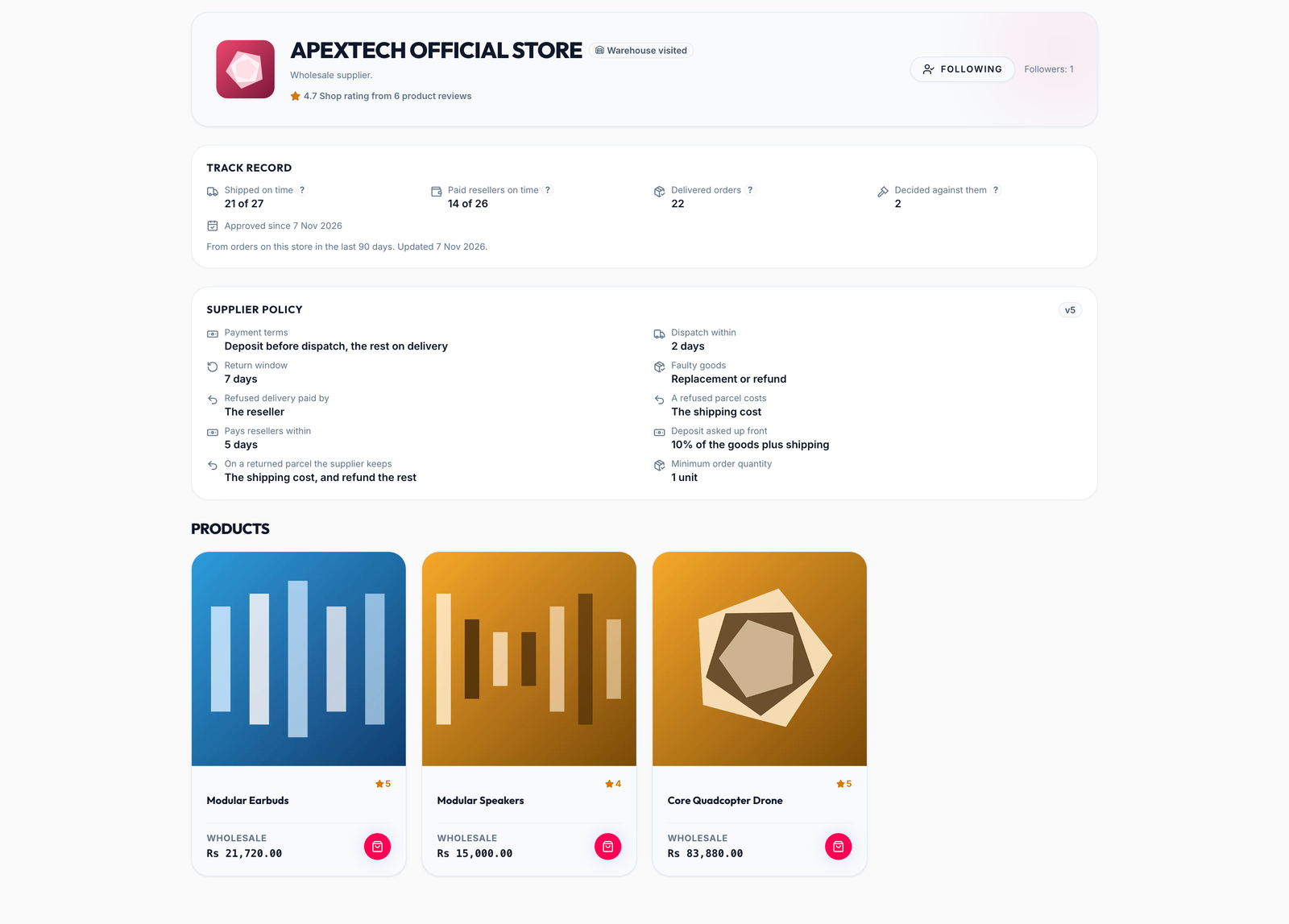
Open a supplier's page and choose Follow. Everything they do that changes what you can sell then reaches you: a new product, a sold-out product back in stock, a wholesale price going down or up, new supplier terms, a vacation starting or ending, and messages they write to their followers. Every supplier page shows how many resellers follow it, what the supplier wrote about their shop, the city they ship from and, once five reviews stand on their products, the average rating. It also shows any badge our team awarded the supplier after checking something by hand, such as a visit to their warehouse; tap a badge to see what was checked and when.
Every supplier page also shows the supplier's Track record from its orders on this store in the last 90 days: orders shipped within its stated dispatch days, what it owed resellers sent in full by the due date, its delivered orders, and outcomes or payment disputes an admin decided against it. Tap the ? beside a figure for exactly what it counts. A supplier with fewer than 5 orders in that time shows as new. The product page repeats the two rates under the supplier's name; the figures are updated daily.
Where do I see what they did?
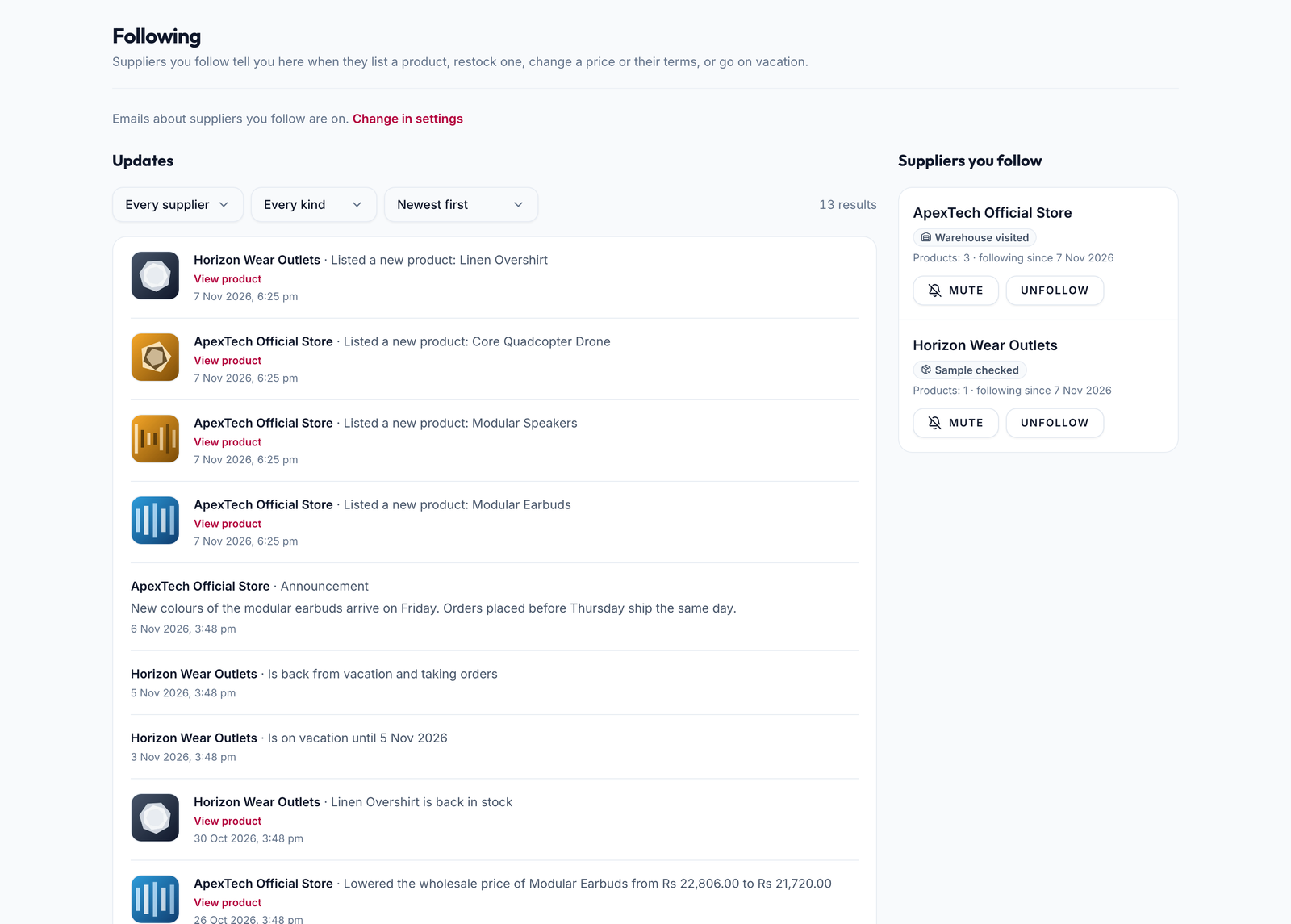
Sourcing, then Following lists every update, newest first, beside the suppliers you follow. Each update also rings the bell; products listed, restocked or re-priced together ring it once. In the catalogue, turn on Suppliers I follow to see only their products.
Will I get emails?
A change to a supplier's terms is emailed at once, because your next order with them is placed under the new terms; orders already placed keep the terms they were placed under. Everything else arrives in one summary email a day. The checkbox at the top of the page turns both off. Updates and emails reach you in the language you last chose on this site.
What if a supplier stops taking orders?
You are told when a supplier you follow is not taking new orders right now, and again when they are taking orders again. The reason is not given: it is between the supplier and the store. Their products leave the catalogue in the meantime.
Can I quieten one supplier?
Choose Mute: their updates stay on the page, with no bell and no email. Unfollow removes them. A supplier sees the names of the resellers who follow them, never an email address or a phone number.
Can I invite other resellers?
Yes. Sourcing, then Invite resellers gives you your own link to send on WhatsApp or anywhere else. Whoever signs up as a reseller through it is counted there by their business name, and the store still approves each account. Make a new link stops the old one working; resellers who already joined stay counted.
During the closed beta, a reseller sees a supplier's products only after using that supplier's invite link, so someone you invite needs one too before they can order.
What this store does and does not offer
Capabilities differ from store to store, because most of them are switches an operator sets. The public home page lists every capability this store runs, read from its own configuration as the page loads; what is on the way is listed separately. That list is the accurate answer for this installation.
See also the Supplier Guide if you are considering listing products as well as reselling them.
Where this store publishes its Terms of Service, Privacy Policy and Refund & Return Policy, they are linked from the footer of every public page and from the checkout.